How to update to 0.0.55
Introduction
This page will guide you through the process of updating your AssettoServer from 0.0.54 to 0.0.55 on a windows machine. If you do not already have a server configured or want to start fresh anyway, read and follow the Beginner's Guide instead.
Prerequisites
To follow along you will need the following things:
- A server already using AssettoServer 0.0.54.
- The latest version of AssettoServer 0.0.55.
- Having read the changes in the Changelog.
- Basic understanding of how text editors work.
Downloading the latest version of AssettoServer 0.0.55
-
Click on
assetto-server-win-x64.zipin the Assets section of the release to download the file.
Backing up & Updating
The new version comes with significant changes to the extra_cfg.yml and how plugins are configured, meaning that you cannot reuse your existing extra_cfg.yml as is.
The following steps have slight differences between hosting in a dedicated folder and within Content Manager, simply click on the corresponding tab below.
- Dedicated Folder
- Inside Content Manager
-
Navigate to the
cfgfolder of your current server and create a new folder calledcfg_old. -
Move your existing
extra_cfg.ymlinto thecfg_oldfolder.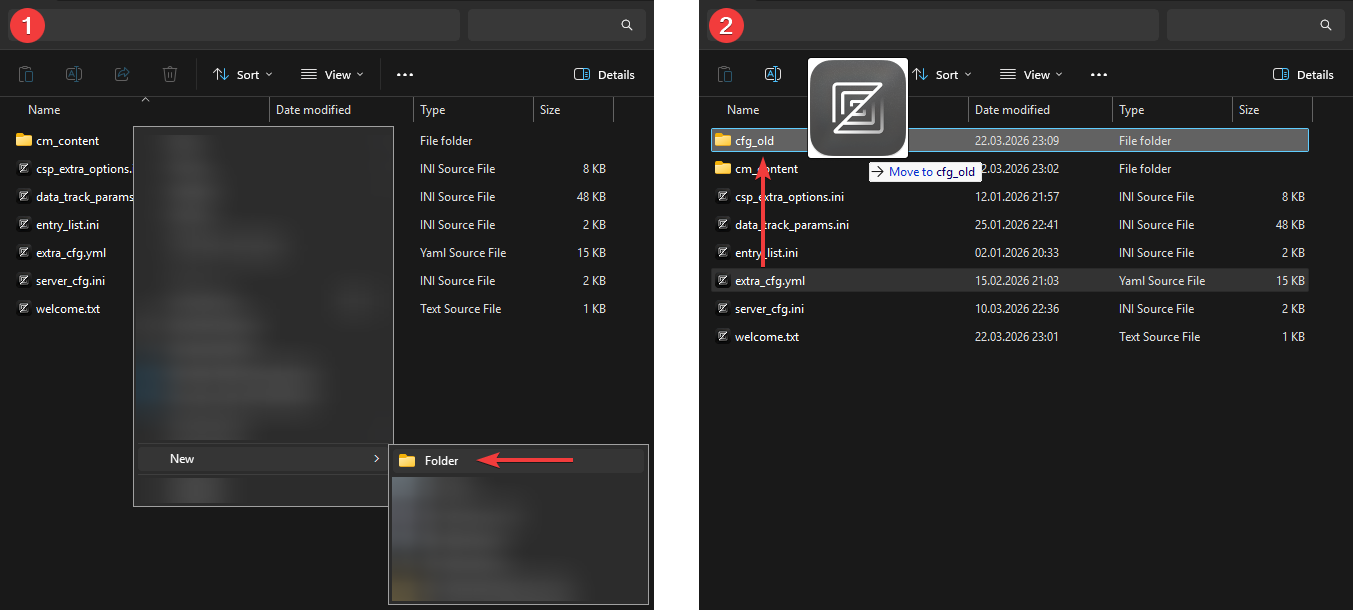
-
Now, navigate back into the main folder of your server and extract the AssettoServer 0.0.55 release
assetto-server-win-x64.zipwe downloaded earlier into it, overwriting files if prompted. -
Run the new
AssettoServer.exeonce to generate a new, updatedextra_cfg.yml. -
Return to the
cfgfolder, open the newextra_cfg.ymland, using your oldextra_cfg.ymlfrom thecfg_oldfolder as a reference, enable the plugins you previously had enabled.
Do not copy the old plugin configurations from the bottom of your oldextra_cfg.yml! -
Run the
AssettoServer.exeagain to generate the new plugin configuration files. They will be generated next to theextra_cfg.ymlinside thecfgfolder. -
Using your old
extra_cfg.ymlyou can now edit theextra_cfg.ymlandplugin_name_cfg.ymlfiles to restore your old settings.
-
Open the preset folder by clicking on the folder button at the bottom of your preset.

-
Create a new folder called
cfg_old. -
Move your existing
extra_cfg.ymlinto thecfg_oldfolder. -
Now, navigate to the
\serverfolder inside your Assetto Corsa installation.
By default, this folder is located inC:\Steam\steamapps\common\assettocorsa\server. -
Extract
assetto-server-win-x64.zipinto theC:\Steam\steamapps\common\assettocorsa\serverfolder so that theAssettoServer.exeis in the same folder asacServer.exe. -
If you already have a
acServer.exewith the AssettoServer logo, simply delete it. Otherwise renameacServer.exeto something else. (acServer_default.exefor example) -
Rename the new
AssettoServer.exetoacServer.exe -
In Content Manager, click on the
Runbutton of the preset to generate a updatedextra_cfg.yml -
Return to the preset folder, open the new
extra_cfg.ymland, using your oldextra_cfg.ymlfrom thecfg_oldfolder as a reference, enable the plugins you previously had enabled.
Do not copy the old plugin configurations from the bottom of your oldextra_cfg.yml! -
Run the preset again to generate the new plugin configuration files. They will be generated next to the
extra_cfg.ymlinside the preset folder. -
Using your old
extra_cfg.ymlyou can now edit theextra_cfg.ymlandplugin_name_cfg.ymlfiles to restore your old settings.
Do not copy or restore old parameters if they are no longer present in the new extra_cfg.yml, they have either been moved somewhere else (like a plugin configuration file) or been removed completely.
Refer to the changelog and the comment above each parameter.